Section 10.7 Certificate, 603 Certificate and Property Enquiry Application
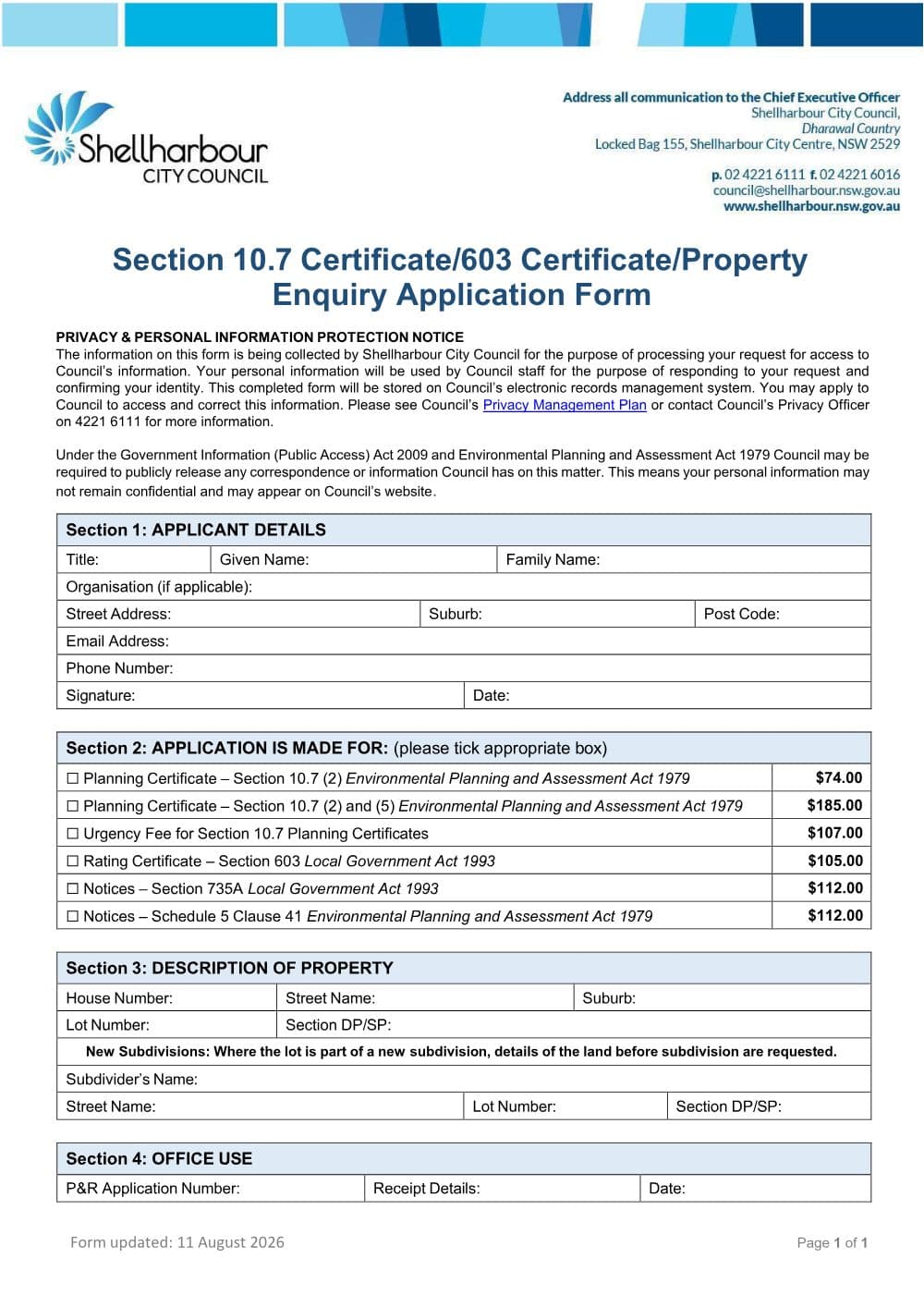
Shellharbour City Council's combined application (NSW) for section 10.7 planning certificates, section 603 rating certificates and outstanding notices searches.
Type into every field, sign it, and save it - all on your own machine. The completed form is never uploaded.
PDF from Shellharbour's website.
DraftOur fillable copy of this form has not been through editorial review yet. Check it against Shellharbour's current form before you rely on it.
- Format
- Category
- Council form
- Version
- vca84f3ad
- Last verified
- 5 September 2026
Local Government Act 1993 (NSW) ss 603, 735A; Environmental Planning and Assessment Act 1979 (NSW) s 10.7
For law practices: this form maps to the published matter-field vocabulary, so your practice management system fills it from your matter data - on your own machine. Practice management systems can fetch and assemble it through the document assembly API.
What the Section 10.7 Certificate, 603 Certificate and Property Enquiry Application is for
One Shellharbour form orders the main council certificates for a sale. It covers planning certificates under section 10.7(2) and 10.7(2) and (5) of the Environmental Planning and Assessment Act 1979, with an urgency fee option; a rating certificate under section 603 of the Local Government Act 1993; and notices certificates under section 735A of the Local Government Act and Schedule 5 of the EP&A Act. The NSW Government's selling guide lists a current section 10.7 zoning certificate issued by the local council and a drainage diagram among the documents a contract for the sale of land must contain. If a required disclosure document is not attached, the purchaser may be entitled to rescind within 14 days of exchange, unless settlement has already happened.
When you need it
- You are selling land in Shellharbour and need the planning certificate for the contract.
- You are buying and want the rates position, the full 10.7(2) and (5) certificate or an outstanding notices search.
How to fill it in
- 1
Section 1: applicant details
Give title, given and family name, organisation (if any), street address, suburb, postcode, email and phone, and sign and date.
- 2
Section 2: certificates
Tick each certificate needed: 10.7(2), 10.7(2) and (5), the 10.7 urgency fee, the section 603 rating certificate, and either notices certificate.
- 3
Section 3: the property
Give the house number, street, suburb, lot, section and DP or SP.
- 4
New subdivisions
If the lot is in a new subdivision, also give the land details before subdivision: the subdivider's name, street, lot, section and DP or SP.
Filing, lodging and service
- The council offers this application as a PDF and as an online form on its forms page. Contact customer service on 02 4221 6111 or council@shellharbour.nsw.gov.au (8.30am to 4.30pm, Monday to Friday) about lodging and payment.
- Each certificate has a fee: check the council's current fees and charges.
Common mistakes
- The privacy notice warns that under the Government Information (Public Access) Act 2009 and the EP&A Act the council may have to release correspondence about the matter, so your details may not stay confidential.
- Use the online form where you can: it is offered alongside the PDF.
Frequently Asked Questions
What is the difference between a 10.7(2) and a 10.7(2) and (5) planning certificate?
A 10.7(2) certificate gives the prescribed planning information: zoning, the planning controls that apply, and constraints such as contamination, flooding and bush fire prone land. A 10.7(2) and (5) certificate includes all of that plus advice from other authorities and other information the council holds about the land.
Do I need a planning certificate to sell a property in NSW?
Yes. The NSW Government's selling guide says the contract for sale must contain a current section 10.7 zoning certificate issued by the local council, along with the title documents and a drainage diagram. The guide also says the contract must be prepared before the property is advertised for sale, so order the certificate early.
Can I order a 603 certificate and a 10.7 certificate on one Shellharbour form?
Yes. This combined form lists planning certificates, the section 603 rating certificate and the notices certificates together; tick each one you need.
Checked against the official sources on 26 October 2026
- Shellharbour City Council - Section 10.7/603 Certificate/Property Enquiry Application Form 2026/2027
- Shellharbour City Council - form page
- NSW Government - Steps to selling a property (what the contract must contain)
General information about the form, not legal advice about your matter. Rules and forms change: if anything here differs from the court or agency's current instructions, theirs apply.