Property Search Form
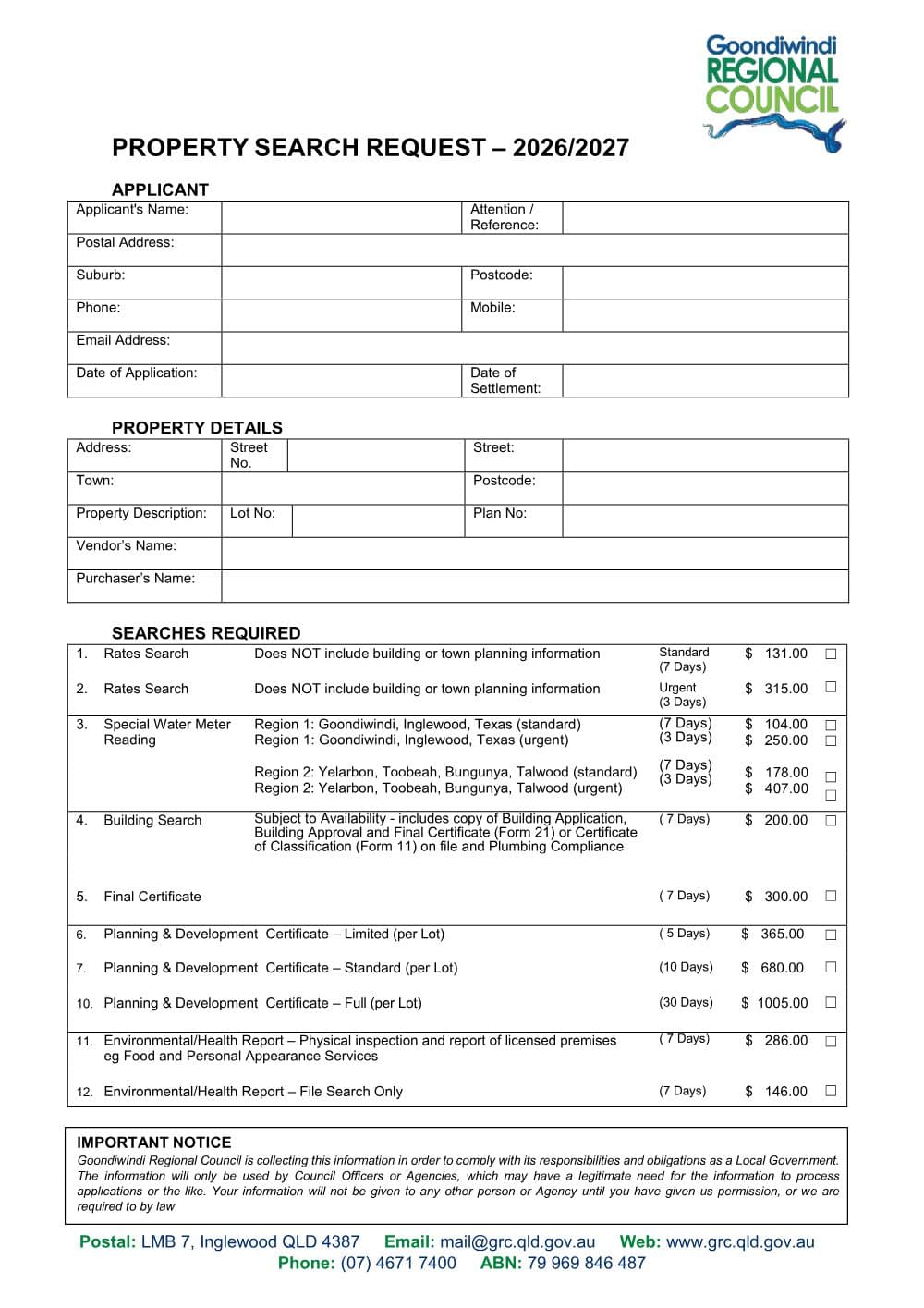
Goondiwindi Regional Council's Property Search Request (Qld) orders rates searches, special water meter readings and building searches. It also orders health and planning searches.
Type into every field, sign it, and save it - all on your own machine. The completed form is never uploaded.
PDF from Goondiwindi Regional Council's website.
DraftOur fillable copy of this form has not been through editorial review yet. Check it against Goondiwindi Regional Council's current form before you rely on it.
- Format
- Category
- Council form
- Version
- v1720902a
- Last verified
- 1 September 2026
Local Government Act 2009 (Qld); Local Government Regulation 2012 (Qld); Planning Act 2016 (Qld)
For law practices: this form maps to the published matter-field vocabulary, so your practice management system fills it from your matter data - on your own machine. Practice management systems can fetch and assemble it through the document assembly API.
What the Property Search Form is for
Goondiwindi Regional Council (Goondiwindi, Inglewood, Texas and surrounds) uses one two-page form for property searches. A rates search reports from council's land record for the property (Local Government Regulation 2012 s 154), which buyers need because overdue rates and charges are a charge on the land (Local Government Act 2009 s 95); it does not include building or town planning information. The form also orders special water meter readings, a building search for copies of approvals and final certificates, limited, standard and full planning and development certificates under section 265 of the Planning Act 2016, and environmental health reports on licensed premises such as food and personal appearance services businesses.
When you need it
- You are buying property in the Goondiwindi region and need the rates position before settlement.
- You need a special water meter reading in Goondiwindi, Inglewood or Texas (Region 1), or Yelarbon, Toobeah, Bungunya or Talwood (Region 2).
- You want copies of the building application, approval, final certificate or certificate of classification and plumbing compliance certificate on file.
- You are buying a licensed food or personal appearance services business and need a health file search or inspection report.
How to fill it in
- 1
Applicant
Give the applicant's name, attention or reference, postal address, suburb, postcode, phone, mobile, email, date of application and date of settlement.
- 2
Property details
Enter the street number, street, town and postcode, the lot and plan, and the vendor's and purchaser's names.
- 3
Searches required
Tick a standard (7 days) or urgent (3 days) rates search; a standard or urgent special water meter reading for the right region; a building search or final certificate (7 days); a limited, standard or full planning and development certificate (5, 10 or 30 days, per lot); or an environmental health inspection report or file search (7 days).
- 4
Payment method
On page 2, choose credit card (card type, name, number, expiry and amount), direct deposit to the council account printed on the form using the reference Search, or cheque.
Filing, lodging and service
- Send the form to Goondiwindi Regional Council, LMB 7, Inglewood QLD 4387, or email mail@grc.qld.gov.au. Phone (07) 4671 7400.
- Timeframes printed on the form range from 3 days for an urgent rates search or meter reading to 30 days for a full planning and development certificate.
- Fees are printed on the form for 2026/2027. Check the current version before paying.
Common mistakes
- A rates search does not include building or town planning information. Tick the building search or a planning certificate as well if you need them.
- The building search depends on what is on file. It provides copies of the building application, approval and final certificate (Form 21) or certificate of classification (Form 11), and the plumbing compliance certificate.
- If you pay by direct deposit, use the reference printed on the form so council can match the payment to your request.
Frequently Asked Questions
How long does a Goondiwindi rates search take?
7 days for a standard rates search or 3 days for an urgent one, according to the form.
How can I pay for a Goondiwindi property search?
By credit card using the details section on page 2, by direct deposit to the council account printed on the form, or by cheque.
Checked against the official sources on 26 October 2026
- Goondiwindi Regional Council - Property Search Request 2026/2027
- Goondiwindi Regional Council - Rates Information
- Local Government Act 2009 (Qld) s 95
- Local Government Regulation 2012 (Qld) s 154
- Planning Act 2016 (Qld) s 265
General information about the form, not legal advice about your matter. Rules and forms change: if anything here differs from the court or agency's current instructions, theirs apply.
Field map
None of the Property Search Form's boxes fill from a matter yet. 41 are for you to complete: ticks, signatures and anything that needs judgement.