Section 10.7 Planning Certificate Application
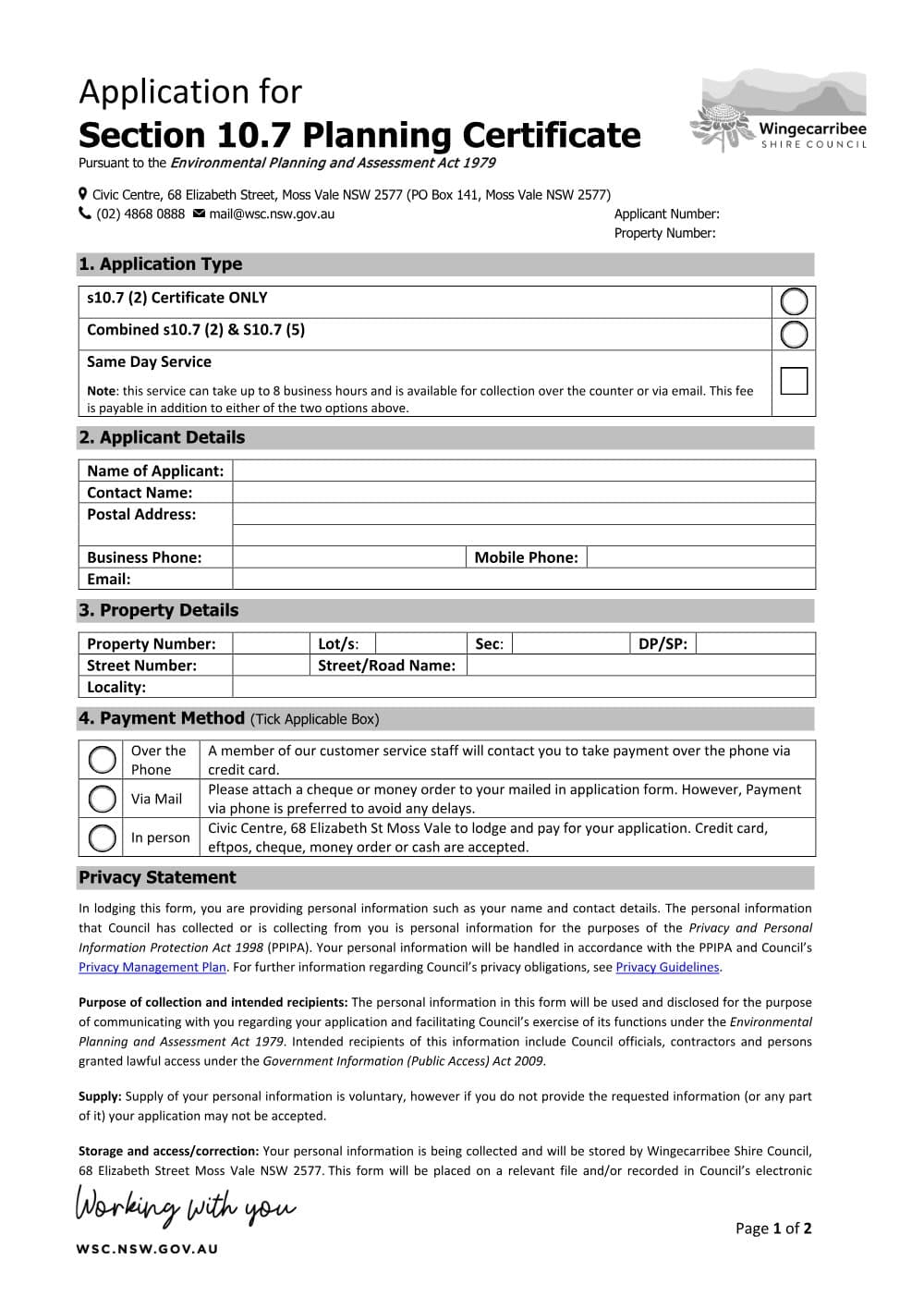
Wingecarribee Shire Council's application for a section 10.7 planning certificate (NSW), with an optional same-day or fast-track service.
Type into every field, sign it, and save it - all on your own machine. The completed form is never uploaded.
PDF from Wingecarribee's website.
DraftOur fillable copy of this form has not been through editorial review yet. Check it against Wingecarribee's current form before you rely on it.
- Format
- Category
- Council form
- Version
- v77a3571a
- Last verified
- 6 September 2026
Environmental Planning and Assessment Act 1979 (NSW) s 10.7
For law practices: this form maps to the published matter-field vocabulary, so your practice management system fills it from your matter data - on your own machine. Practice management systems can fetch and assemble it through the document assembly API.
What the Section 10.7 Planning Certificate Application is for
Wingecarribee Shire Council issues section 10.7 planning certificates under section 10.7 of the Environmental Planning and Assessment Act 1979 and Schedule 2 of the Environmental Planning and Assessment Regulation 2021, and says the fees are regulated under that Regulation. A certificate covers a single lot in a DP or SP. A 10.7(2) certificate gives zoning, planning controls and information such as heritage, flooding, contamination, mine subsidence and bush fire; a 10.7(2) and (5) certificate adds information at the council's discretion. The council now takes applications online; this PDF is version 1.7 (2021).
When you need it
- You are selling land in Wingecarribee Shire: the council says a 10.7 certificate must legally be attached to a contract for the sale of land.
- You are buying: the council recommends the 10.7(2) and (5) certificate when purchasing land.
How to fill it in
- 1
Application type
Tick a 10.7(2) certificate only or a combined 10.7(2) and (5) certificate. Add the same-day or fast-track service if needed; it is charged on top.
- 2
Applicant details
Give the applicant's name, contact name, postal address, business and mobile phone and email. The certificate is emailed.
- 3
Property details
Give the property number, lots, section, DP or SP, street number and name and locality. Each certificate covers one lot.
- 4
Payment method
Tick over the phone (customer service calls you to take a credit card payment, the preferred option), by mail (attach a cheque or money order), or in person at the Civic Centre, 68 Elizabeth Street, Moss Vale (credit card, EFTPOS, cheque, money order or cash).
Filing, lodging and service
- The council's current process is its online eService portal, where several certificates can be ordered at once. Certificates are issued by email to the address you give.
- The council says a certificate normally takes up to 5 business days from receipting. Receipting usually happens by 10am the day after lodgement if lodged before 4pm. Fast-track applications are processed by 12pm on the day of receipting.
- Help: 1300 680 888 or the Civic Centre, 68 Elizabeth Street, Moss Vale. Check the current fees on the council's page.
Common mistakes
- Check the certificate type, lot and DP or SP and email address before paying: the council cannot refund incorrect details, duplicates or a change of mind.
- A property on several lots needs one certificate for each lot.
Frequently Asked Questions
What is the difference between a 10.7(2) and a 10.7(2) and (5) planning certificate?
A 10.7(2) certificate gives the prescribed planning information: zoning, the planning controls that apply, and constraints such as contamination, flooding and bush fire prone land. A 10.7(2) and (5) certificate includes all of that plus advice from other authorities and other information the council holds about the land.
How long does a Wingecarribee planning certificate take?
Normally up to 5 business days from receipting. With the Fast Track service, for an extra fee, it is processed by noon on the day of receipting.
Checked against the official sources on 26 October 2026
- Wingecarribee Shire Council - Section 10.7 Planning Certificate Application, v1.7 (form)
- Wingecarribee Shire Council - Section 10.7 Planning Certificate Application
General information about the form, not legal advice about your matter. Rules and forms change: if anything here differs from the court or agency's current instructions, theirs apply.
Field map
None of the Section 10.7 Planning Certificate Application's boxes fill from a matter yet. 22 are for you to complete: ticks, signatures and anything that needs judgement.