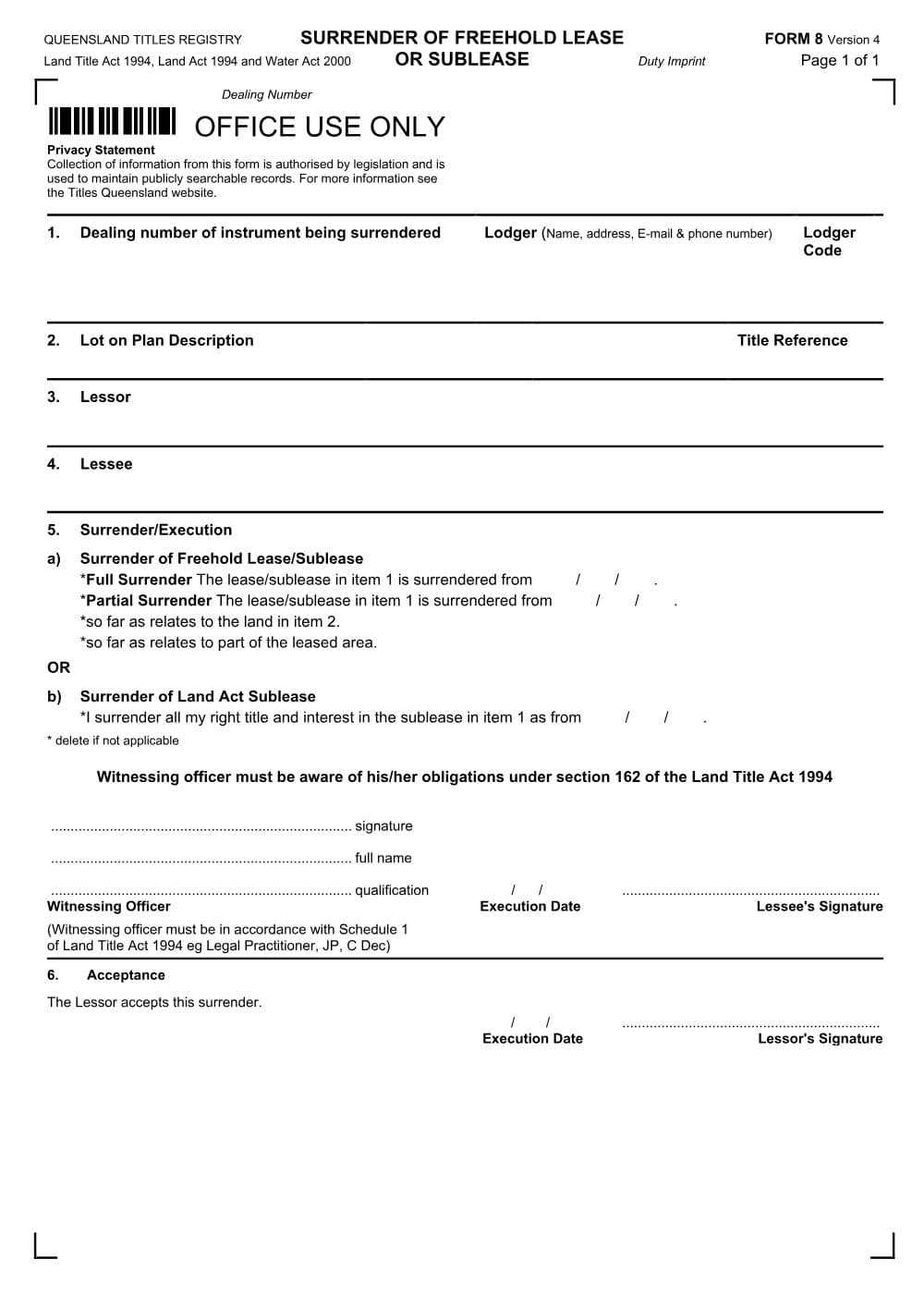
Surrender of freehold lease or sub-lease (Form 8)
Form 8 is the Titles Queensland form for surrendering a registered lease or sub-lease of Queensland freehold land, wholly or partly. A lessor and lessee sign it before the term ends.
PDF from Titles Queensland's website.
DraftOur fillable copy of this form has not been through editorial review yet. Check it against Titles Queensland's current form before you rely on it.
- Format
- Word (DOCX)
- Category
- Land titles form
- Form number
- Form 8
- Version
- v2328abe3
- Last updated
- 26 October 2026
Land Title Act 1994
For law practices: this form maps to the published matter-field vocabulary, so your practice management system fills it from your matter data - on your own machine. Practice management systems can fetch and assemble it through the document assembly API.
What Form 8 is for
Under section 69 of the Land Title Act 1994 (Qld), a registered lease may be wholly or partly surrendered by operation of law, or by registering an instrument of surrender signed by the lessor and the lessee. A surrender by registered instrument needs the consent of every registered mortgagee and registered sublessee of the lessee (s 69(2)). When the surrender is registered, the Registrar records the surrender date and the lessee's interest vests in the lessor (s 69(4), (5)). Form 8 is that instrument. Land Title Practice Manual (LTPM) Part 8 explains the practice, including partial surrenders and leases also burdened by an easement.
When you need it
- The lessor and lessee have agreed to end a registered lease or sub-lease early, in whole or in part.
- Only part of the leased premises is being given back, and that part can be precisely defined (by a whole lot, whole building or whole floor, or by a plan or sketch) (LTPM [8-2000]).
- Not needed where the lessor grants the same lessee a new lease of the same premises during the existing lease, which surrenders the old lease by operation of law; that is dealt with in Item 9 of the new Form 7.
- Not used to clear an expired lease from the title (that is a Form 14 request) or to record a lessor's re-entry (also Form 14).
How to fill it in
- 1
Lodger panel and Item 1: the lease
Complete the lodger details. In Item 1 insert the dealing number of the lease or sub-lease being surrendered. It appears on a current title search under the registered interests.
- 2
Item 2: land
Insert the lot on plan description with its plan prefix and the title reference.
- 3
Items 3 and 4: parties
Insert the full name of the lessor (or sub-lessor) in Item 3 and the lessee (or sub-lessee) in Item 4.
- 4
Item 5: surrender and lessee's signature
Complete the surrender details and the date of surrender, and delete the paragraph, sentence or words that do not apply. The surrender date cannot be after the date the Form 8 is lodged (LTPM [8-4050]). The lessee signs in front of a witness listed in Schedule 1 of the Land Title Act 1994.
- 5
Item 6: lessor's acceptance
The lessor signs and dates the acceptance of the surrender.
Filing, lodging and service
- Deposit a Form 18 General Consent from every registered mortgagee and sublessee of the lessee. If the lease is also the burdened interest of a registered easement, the consent of the easement grantee and of the mortgagees and lessees who benefit from the easement must also be deposited (LTPM [8-0030], [8-2000]).
- Lodgement fees are payable and a duty notation is required (LTPM [8-2000]). Check the current fee with the Titles Queensland fee calculator.
- Lodge by post to Titles Queensland, GPO Box 1401, Brisbane Qld 4001, or through eLodgement if you are a registered industry user. There is no need to deposit copies of the surrendered lease.
- For a partial surrender of part of a lot that cannot otherwise be precisely defined, a plan of survey or explanatory format plan must be lodged first; for part of a floor, bind a sketch plan into the surrender (LTPM [8-2000]).
Common mistakes
- Get a current title search before you start, to confirm the lease dealing number and to see whether the lease is mortgaged or sub-let, since those parties must consent.
- Surrendering a head lease does not end a registered sub-lease; the sub-lease continues (LTPM [8-0030]).
- If the lessee cannot be found, the lessor may be able to sign under a power of attorney in the lease, but that power must be registered first (LTPM [8-2020]).
Frequently Asked Questions
Do I need the bank's consent to surrender a lease in Queensland?
You need the consent of every registered mortgagee and registered sublessee of the lessee, that is, anyone holding a registered mortgage over the lease itself or a registered sub-lease (s 69(2)). The consent is given on a Form 18 and deposited with the Form 8.
Where do I find the dealing number of the lease being surrendered?
On a current title search for the lot. Registered leases are listed with their dealing numbers under the registered interests on the title. Titles Queensland sells title searches online.
Can the surrender take effect from a future date?
No. The LTPM states that the surrender date inserted in Item 5 cannot be later than the date the Form 8 is lodged.
Checked against the official sources on 26 October 2026
- Land Title Act 1994 (Qld) s 69 and Schedule 1
- Land Title Practice Manual Part 8 - Surrender of lease
- Titles Queensland - Form 8 Surrender of freehold lease or sublease (version 4)
- Land Title Practice Manual Part 18 - General consent
- Titles Queensland - Paper lodgement
- Titles Queensland - Fee calculator
General information about the form, not legal advice about your matter. Rules and forms change: if anything here differs from the court or agency's current instructions, theirs apply.
More from Titles Queensland
Amendment (Form 13)
Form 13 (Amendment) is the Titles Queensland form to amend a registered lease, easement, mortgage, covenant, profit a prendre or building management statement. It can extend a lease.
Caveat (Form 11)
Form 11 is the Titles Queensland caveat that a person claiming an interest in Queensland land lodges to stop other dealings being registered on the title. Word and PDF versions are available.
Covenant (Form 31)
Form 31 is the Titles Queensland form for registering a statutory covenant over a Queensland lot in favour of the State, a State entity or a local government.
Declaration (annexure) - electronic version (Form 20)
This Form 20 is the Titles Queensland statutory declaration annexure, in a type-in electronic version. It gives declared evidence with a Land Registry form but must still be signed on paper before a witness.
Easement (Form 9)
Form 9 is the Titles Queensland instrument for granting a registered easement over Queensland land. It covers rights of way, drainage easements and the like, for another lot or a public utility provider.
Foreign ownership information (Form 25)
Form 25 is the Titles Queensland form a foreign person uses to notify the Foreign Ownership of Land Register when acquiring an interest in Queensland land.