Transmission application for devisee/legatee (Form 6)
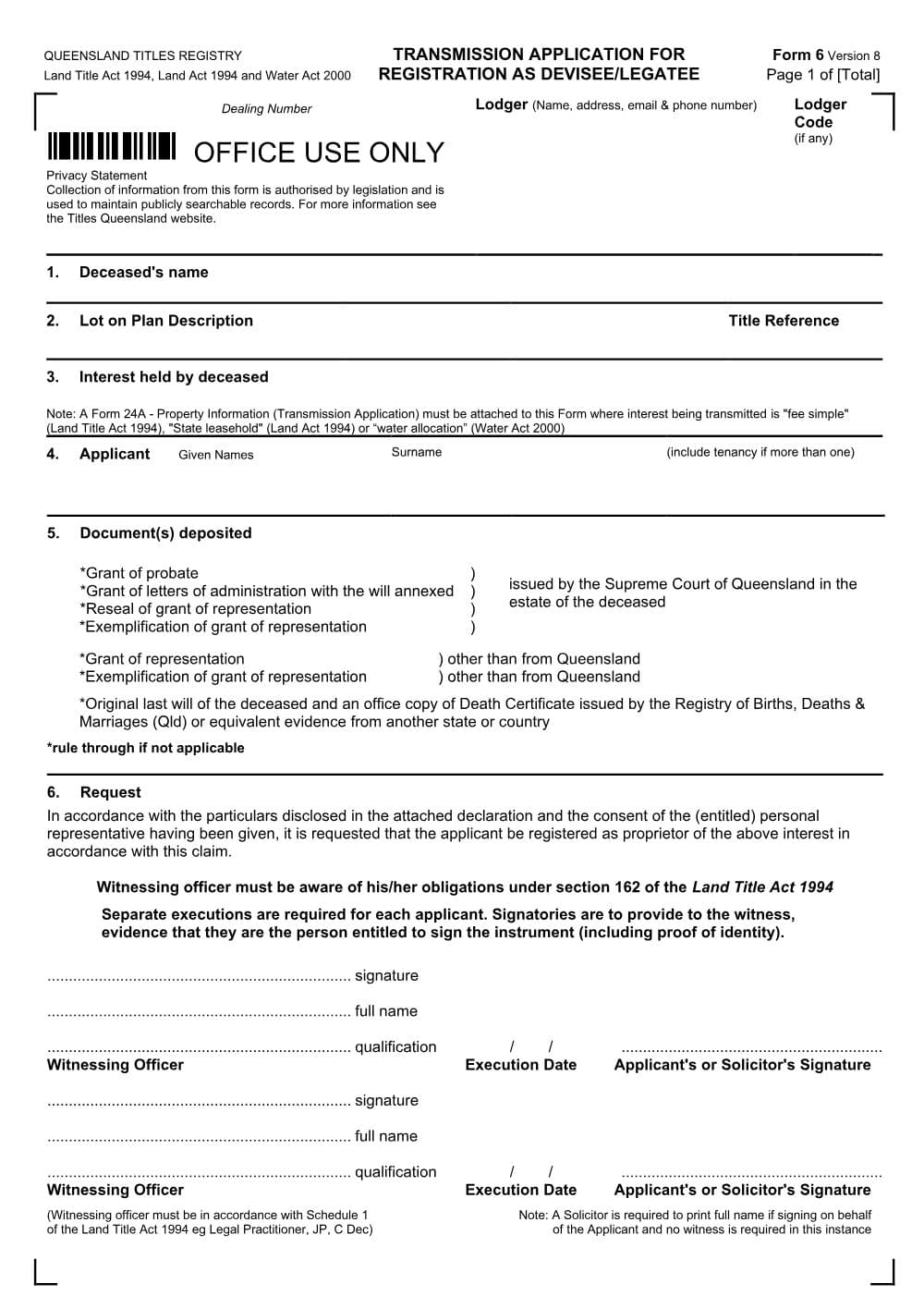
Form 6 is the Titles Queensland transmission application for a beneficiary named in a will to be registered as owner of a deceased person's Queensland land. The personal representative consents.
PDF from Titles Queensland's website.
DraftOur fillable copy of this form has not been through editorial review yet. Check it against Titles Queensland's current form before you rely on it.
- Format
- Word (DOCX)
- Category
- Land titles form
- Form number
- Form 6
- Version
- vc3b546f6
- Last updated
- 26 October 2026
Land Title Act 1994; Land Act 1994; Water Act 2000
For law practices: this form maps to the published matter-field vocabulary, so your practice management system fills it from your matter data - on your own machine. Practice management systems can fetch and assemble it through the document assembly API.
What Form 6 is for
A person beneficially entitled under a will to a lot or interest of a deceased registered owner may apply to be registered as its owner (Land Title Act 1994 (Qld) s 112(1)). The Registrar may register them only if written consent is given by the person who is, or is entitled to be, the deceased's personal representative (or a person who would succeed in obtaining or resealing a grant), and the applicant satisfies the Registrar of their entitlement (s 112(2)). The application must state the lot, the interest sought and the nature of other known interests in the lot (s 113). Form 6 (version 8) is that application. It has three parts: the application, a declaration by the applicant, and the consent of the personal representative. It can be supported by a grant of probate or, where the will has not been proved, by the original will and a death certificate (Land Title Practice Manual (LTPM) [5-2000]).
When you need it
- A beneficiary (devisee or legatee) under a will wants the deceased's land or interest registered directly in their name, rather than first in the executor's name.
- The personal representative (or person entitled to be one) is willing to sign the consent, confirming debts, funeral and testamentary expenses and legacies have been paid or provided for.
- The deceased was a sole owner or tenant in common. A joint tenancy passes by survivorship and is recorded with Form 4.
- To register the executor or administrator instead, use Form 5 or Form 5A.
How to fill it in
- 1
Page 1, Items 1 to 4: deceased, land, interest and applicant
Insert the deceased's name as recorded on the title, the lot on plan and title reference, and the interest held (with the fraction if only a share, for example '1/2 interest in Fee Simple'). In Item 4 insert each applicant's full name and, if more than one, how they will hold (for example 'as tenants in common in equal shares').
- 2
Page 1, Item 5: documents deposited
Keep the documents being deposited and rule through the rest: a grant of probate, letters of administration with the will annexed or a reseal from the Supreme Court of Queensland, an exemplification or grant from elsewhere, or the original last will with a death certificate. If there is a will, the original will and death certificate must be deposited (LTPM [5-4260]).
- 3
Page 1, Item 6: request and signing
Each applicant signs separately before a witness listed in Schedule 1 of the Land Title Act 1994, giving the witness evidence of identity. Alternatively a solicitor signs for the applicant, prints their full name, and no witness is needed.
- 4
Page 2: declaration by applicant
Complete the declaration: that the applicant is the devisee or legatee, the will clause describing the land (if needed), that the attached Form 24A is correct, and the statements about marriage, civil partnership, de facto relationships and witnessing of the will that apply. Rule through what does not apply. Paragraph 6 (a Queensland search showing no grant) is needed only if the will is not proved or resealed in Queensland. It must be witnessed by a person authorised under the relevant oaths law.
- 5
Page 3: consent of personal representative
Each personal representative inserts their name and address, states the basis of their entitlement (grant, named executor, or other), and signs before a Schedule 1 witness. The consent is required even if the personal representative is also the applicant (LTPM [5-4350]).
Filing, lodging and service
- Lodge the Form 6 with the documents listed in Item 5, any supplementary statutory declarations, a Form 24A (Property information - transmission application) for fee simple, State tenure or a water allocation, and a Form 25 (Foreign ownership information) if applicable (LTPM [5-4360]).
- An original will must be posted to the registry. It is not returned: it is kept as a permanent public record and released only to the Supreme Court for a grant application or in limited withdrawal cases (LTPM [60-1030-4], [5-2130]).
- Lodge by post to Titles Queensland, GPO Box 1401, Brisbane Qld 4001, or through eLodgement if you are a registered industry user. Form 6 is not one of the dealings accepted by TED or listed for eConveyancing.
- A lodgement fee applies; check the current amount with the Titles Queensland fee calculator.
Common mistakes
- Never staple, pin, clip or mark an original will. Any sign of an attachment can suggest another testamentary document was attached, and the Registrar may then require a declaration of plight and condition (LTPM [5-2080]).
- Where the cause of death on the death certificate suggests the deceased may have lacked testamentary capacity when the will was made, expect to provide medical or solicitor evidence of capacity (LTPM [5-4260]).
- If the beneficiary is named differently in the will, is a substituted beneficiary, or must meet a condition such as reaching an age, include evidence of entitlement in the declaration (LTPM [5-4290]).
Frequently Asked Questions
Can a beneficiary transfer property into their name without probate in Queensland?
A Form 6 can be supported by the original will and a death certificate instead of a grant, with the written consent of the person entitled to be the personal representative and a declaration that a search found no grant or caveat in Queensland. The Registrar must still be satisfied of the applicant's entitlement (s 112). Whether this suits a particular estate is a question for a solicitor.
What is Form 24A and do I need it with Form 6?
Form 24A (Property information - transmission application) collects information for other government agencies. It must be lodged with a Form 6 for fee simple land, State tenure or a water allocation, and the applicant declares in the Form 6 declaration that its contents are correct.
Do I need the executor's consent if I am both executor and beneficiary?
Yes. The LTPM states that the consent of the personal representative is required even if the personal representative and the applicant are the same person, and each personal representative signs separately.
Checked against the official sources on 26 October 2026
- Land Title Act 1994 (Qld) ss 112, 113, 162 and Schedule 1
- Land Title Practice Manual Parts 5, 5A and 6 - Transmission applications
- Titles Queensland - Form 6 Transmission application for devisee/legatee (version 8)
- Land Title Practice Manual Part 60 - Fees, lodgement and general titling practice
- Land Title Practice Manual Part 24 - Property transfer information (Form 24A)
- Titles Queensland - Titles Electronic Drop Box (TED)
- Titles Queensland - Fee calculator
General information about the form, not legal advice about your matter. Rules and forms change: if anything here differs from the court or agency's current instructions, theirs apply.
Matter plans that use this form
More from Titles Queensland
Amendment (Form 13)
Form 13 (Amendment) is the Titles Queensland form to amend a registered lease, easement, mortgage, covenant, profit a prendre or building management statement. It can extend a lease.
Caveat (Form 11)
Form 11 is the Titles Queensland caveat that a person claiming an interest in Queensland land lodges to stop other dealings being registered on the title. Word and PDF versions are available.
Covenant (Form 31)
Form 31 is the Titles Queensland form for registering a statutory covenant over a Queensland lot in favour of the State, a State entity or a local government.
Declaration (annexure) - electronic version (Form 20)
This Form 20 is the Titles Queensland statutory declaration annexure, in a type-in electronic version. It gives declared evidence with a Land Registry form but must still be signed on paper before a witness.
Easement (Form 9)
Form 9 is the Titles Queensland instrument for granting a registered easement over Queensland land. It covers rights of way, drainage easements and the like, for another lot or a public utility provider.
Foreign ownership information (Form 25)
Form 25 is the Titles Queensland form a foreign person uses to notify the Foreign Ownership of Land Register when acquiring an interest in Queensland land.