Transmission application (Grant in Queensland or Queensland Recognised Grant) (Form 5)
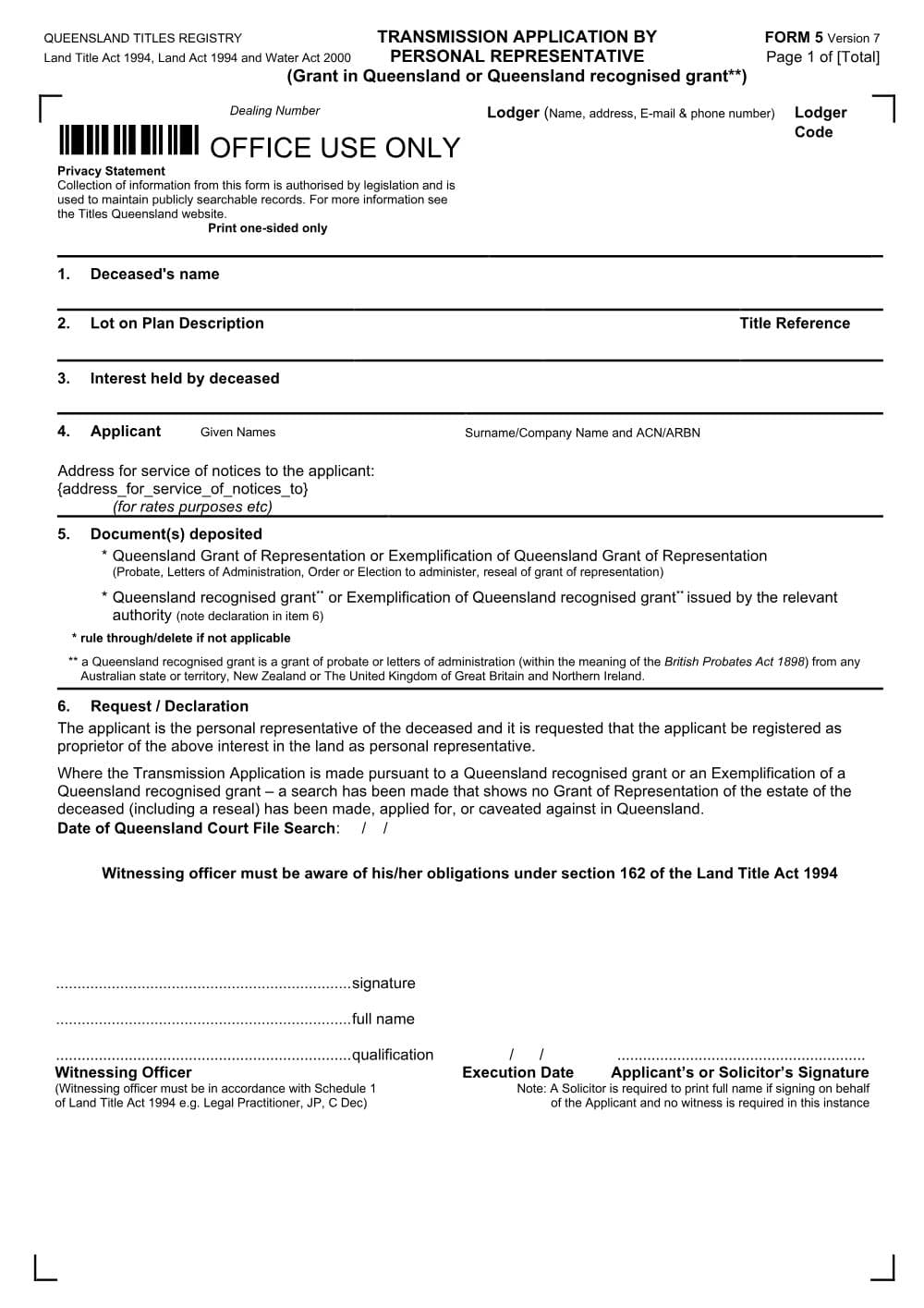
Form 5 is the Titles Queensland transmission application for an executor or administrator to become personal representative of a deceased owner's land. It uses a Queensland or recognised grant.
PDF from Titles Queensland's website.
DraftOur fillable copy of this form has not been through editorial review yet. Check it against Titles Queensland's current form before you rely on it.
- Format
- Word (DOCX)
- Category
- Land titles form
- Form number
- Form 5
- Version
- v2b296a0a
- Last updated
- 26 October 2026
Land Title Act 1994; Land Act 1994; Water Act 2000
For law practices: this form maps to the published matter-field vocabulary, so your practice management system fills it from your matter data - on your own machine. Practice management systems can fetch and assemble it through the document assembly API.
What Form 5 is for
A person may apply to the Registrar to be registered as personal representative of a registered proprietor who has died; the Registrar may do so if the person has obtained a grant of representation in Queensland or the resealing in Queensland of a grant (Land Title Act 1994 (Qld) s 111(2)(a)); a limited alternative applies to some small intestate estates (s 111(2)(b)). Form 5 is the application for that case, and it also covers a 'Queensland recognised grant': a grant of probate or letters of administration from another Australian state or territory, New Zealand or the United Kingdom within the meaning of the British Probates Act 1898 (as noted on the form). Where there is no Queensland or recognised grant, Form 5A is used. Form 5 is for a sole owner or a tenant in common; the death of a joint tenant is recorded with Form 4, and a beneficiary who wants to be registered directly uses Form 6 (Land Title Practice Manual (LTPM) [5-2000]).
When you need it
- The deceased was the sole registered owner, or a tenant in common, of a Queensland lot or interest (lease, mortgage, State lease or water allocation).
- Probate, letters of administration, an order or election to administer, or a reseal has been granted in Queensland, or there is a recognised grant from another Australian state or territory, New Zealand or the UK.
- The executor or administrator wants the title recorded in their name as personal representative, before selling or transferring the property to beneficiaries.
- Not for a joint tenancy (use Form 4), and not where there is no grant (use Form 5A).
How to fill it in
- 1
Lodger panel and Item 1: deceased's name
Complete the lodger details. In Item 1 insert the deceased's name as recorded on the title. Where a personal representative is already recorded and a new one has been appointed, use the expanded wording in LTPM [5-4010].
- 2
Items 2 and 3: land and interest
Insert each lot on plan description and title reference (use a Form 20 Enlarged Panel if needed). In Item 3 insert the interest, such as 'Fee Simple' or 'Lease No. [number]', and where the deceased held only a share, the fraction, for example '1/2 interest in Fee Simple'.
- 3
Item 4: applicant
Insert the full name of the applicant, matching the person named in the grant (or on the face of a Queensland reseal), with the ACN for a trustee company, and a postal address for service of notices such as rates.
- 4
Item 5: documents deposited
Identify the grant being relied on (probate, letters of administration, order or election to administer, reseal, or a recognised grant) and rule through the categories that do not apply. If the deceased's name in the grant differs from the title, a statutory declaration that they are the same person is needed (LTPM [5-4080]).
- 5
Item 6: request, declaration and signing
If relying on a recognised grant that has not been resealed in Queensland, insert the date of the Queensland court file search showing no grant, reseal application or caveat in Queensland; otherwise leave it blank. The applicant signs before a Schedule 1 witness (such as a JP, commissioner for declarations or lawyer), or the applicant's solicitor signs, prints their full name, and no witness is needed (LTPM [5-4060]).
Filing, lodging and service
- Deposit the grant relied on: the original or a Supreme Court office copy of probate, a reseal, letters of administration, or the other documents listed in LTPM [5-4090], plus any name declarations. Follow the deposit rules in LTPM [60-1030].
- Self-represented applicants can lodge Form 5 online through the Titles Electronic Drop Box (TED) ('Transmission by Death (Grant Issued)') or by post to Titles Queensland, GPO Box 1401, Brisbane Qld 4001.
- For industry professionals, a Form 5 is a required instrument under the eConveyancing mandate and must be lodged through an electronic lodgment network unless an exemption applies (for example a part-title dealing, or a death before 1 January 1982). In eConveyancing the grant is not provided; the subscriber enters its particulars and keeps a copy (LTPM [5-4090]).
- A lodgement fee applies; check the current amount with the Titles Queensland fee calculator.
Common mistakes
- Run the Queensland court file search immediately before signing a Form 5 based on an unresealed recognised grant, and lodge promptly afterwards (LTPM [5-4060]).
- Make sure the applicant's name in Item 4 matches the grant exactly. With a Queensland reseal, the applicant must be the person named on the face of the reseal.
- A separate application is needed for each different interest being transmitted (LTPM [5-4020]).
Frequently Asked Questions
What is the difference between Form 5, Form 5A and Form 6?
Form 5 registers the personal representative where there is a Queensland grant or a Queensland recognised grant. Form 5A registers the personal representative where there is no such grant. Form 6 registers a beneficiary named in the will (a devisee or legatee) directly, with the personal representative's consent.
Can I lodge a Form 5 transmission application online?
Yes. Self-represented applicants can lodge Form 5 through Titles Queensland's Titles Electronic Drop Box (TED). Lawyers and conveyancers must generally lodge it through eConveyancing, because Form 5 is a required instrument under the mandate.
Does the executor need a witness to sign Form 5?
Yes, unless a solicitor signs on the executor's behalf. The executor signs in front of a witness listed in Schedule 1 of the Land Title Act 1994. A solicitor signing for the applicant prints their full name and does not need a witness.
Checked against the official sources on 26 October 2026
- Land Title Act 1994 (Qld) ss 111, 161, 162 and Schedule 1
- Land Title Practice Manual Parts 5, 5A and 6 - Transmission applications
- Titles Queensland - Form 5 Transmission application by personal representative (version 7)
- Land Title Practice Manual Part 62 - eConveyancing ([62-6010] required instruments)
- Titles Queensland - eConveyancing available instruments, exclusions and exemptions
- Titles Queensland - Titles Electronic Drop Box (TED)
- Titles Queensland - Fee calculator
General information about the form, not legal advice about your matter. Rules and forms change: if anything here differs from the court or agency's current instructions, theirs apply.
Field map
1 box on the Transmission application (Grant in Queensland or Queensland Recognised Grant) (Form 5) fill from your matter.
- Our Firm
- Firm address
Matter plans that use this form
More from Titles Queensland
Amendment (Form 13)
Form 13 (Amendment) is the Titles Queensland form to amend a registered lease, easement, mortgage, covenant, profit a prendre or building management statement. It can extend a lease.
Caveat (Form 11)
Form 11 is the Titles Queensland caveat that a person claiming an interest in Queensland land lodges to stop other dealings being registered on the title. Word and PDF versions are available.
Covenant (Form 31)
Form 31 is the Titles Queensland form for registering a statutory covenant over a Queensland lot in favour of the State, a State entity or a local government.
Declaration (annexure) - electronic version (Form 20)
This Form 20 is the Titles Queensland statutory declaration annexure, in a type-in electronic version. It gives declared evidence with a Land Registry form but must still be signed on paper before a witness.
Easement (Form 9)
Form 9 is the Titles Queensland instrument for granting a registered easement over Queensland land. It covers rights of way, drainage easements and the like, for another lot or a public utility provider.
Foreign ownership information (Form 25)
Form 25 is the Titles Queensland form a foreign person uses to notify the Foreign Ownership of Land Register when acquiring an interest in Queensland land.